Archive for the ‘blog’ Category
Optimizing WordPos
WordPos is pretty slow. A 512-word corpus (220 lookups less stopwords and duplicates) with getPOS() takes about 8 seconds (dual core 64-bit win7). Â Clearly there is room for optimization.
WordNet index files are simple text files, one line per word, Â sorted by the word. Â The entry for ‘awesome’ in index.adj is
awesome a 1 1 & 1 0 01282510
‘a’ (or ‘s’) means it’s an adjective, and the last 8-digit number is the byte offset in the file data.adj which contains the definition. Â Words can have multiple synonyms, so there could be more byte offsets, space separated.
Natural’s lookup() does a binary search of the word in the index file. Â The largest index file is index.noun with 117,798 words taking O(log N) = 17 iterations to find the correct line.
Bucketize
What if we use a secondary index to speed things up, using the first two characters of the word as a hash to bucketize the entries, then search within the bucket. Â Table below shows the result using a 2-char hash key:
| index | #words | #buckets | avg bucket size |
| Noun | 117,798 | 679 | 173 |
| Adjective | 21,479 | 416 | 51 |
| Verb | 11,529 | 225 | 51 |
| Adverb | 4,481 | 213 | 21 |
| O(#words) | O(avg bucket size) |
| Â 17 | 8 |
| 14 | 6 |
| 14 | 6 |
| 12 | 5 |
So now a word can be found typically in less than half the iterations as before. Â Indeed getPOS() now takes about 4.2 seconds. Â Still not fast enough.
What if we bucketize based on 3-char hash key.
| index | #words | #buckets | avg bucket size |
| Noun | 117,798 | 4493 | 26 |
| Adjective | 21,479 | 2326 | 9 |
| Verb | 11,529 | 1623 | 7 |
| Adverb | 4,481 | 1170 | 3.8 |
| O(#words) | O(avg bucket size) |
| Â 17 | 5 |
| 14 | 3 |
| 14 | 3 |
| 12 | 2 |
Number of iterations drop by half again, and getPOS() now takes about 2.2 seconds. Â That’s a four-fold increase in performance over the original scheme.
Fast-index
These secondary index files, which we’ll call the fast-index files, are saved as JSON objects and loaded into memory for fast lookup. Â The format of the fast-index file is:
{
  // <meta info>
  "offsets":{
    ...
    "awe":[74929,"awf"]
    ...
  }
}
“awe” is the 3-char key of the bucket, 74929 is the starting offset in the main index file, and “awf” is the next bucket key (next key is essential as Object literals have no inherent sort order). So the algorithm becomes:
find key (first 3 chars of word)
look it up in offsets: O(1)
if it exists:
  get offset of key and offset of next key
  read main index file between the two offsets
  binary search read data: O(log avg)
These fast-index files add up to less than 200 KB memory footprint, which is quite manageable. (Four main index files are about 6 MB.)
The bottleneck
2.2 seconds isn’t too bad to look up 220 words in 4 files and 6 MB of data (that’s about 10 msec/word). Â But it’s not web-scale! Â Turns out natural’s WordNet module is pretty conservative in its disk read for the binary search. Â It reads one character at a time to find the enclosing EOLs of a line. Â This is done asynchronously and each byte read incurs a callback.
Now with the bucketized scheme, we know precisely the boundary of the bucket.  For example, index.noun buckets average 26 entries (or lines).  Assume each line averages two synonyms is about 42 bytes, we have 26 × 42 ≈ 1 KB to read on average.  The worst case is the ‘gen’ bucket for index.noun with 3859 entries, or about 167 KB that have to be read.  Next biggest bucket has about 1200 entries or 50 KB, and it continues to decline fast.  This is still quite manageable, specially if care is taken to properly cache the disk reads.
So reading  bucket-at-a-time, using split(‘\n’) to break the buffer into lines, then binary searching for the word on each line, now getPOS() takes about 70 msec, a 30-fold improvement over the previous best of 2.2 seconds.  Now we’re talking web-scale.
Clearly the bottleneck is the disk read.
Finer grain
70 msec is pretty good from the original 8 seconds.  Any additional optimization should be weighed against the effort put in to it.  However, one thing is obvious.  If we’re looking up, e.g.,
wordpos.getAdjectives('It was so awesome that I was awestruck', console.log)
Both ‘awesome’ and  ‘awestruck’ belong in the same ‘awe’ bucket, so we shouldn’t read the ‘awe’ bucket from disk twice.  Instead, we’ll queue up the callbacks for each bucket and process them once the bucket has been read.
Ready to use
These and other optimizations are in wordpos 0.1.4, available on github. Â The fast-index files are generated at install time and placed in the same folder as WNdb’s dictionary folder. Â If any errors occurs or the json files can’t be read, the original lookup method is used.
Introducing WordPos
Wordpos (github, MIT license) is a node.js library and npm module build on top of natural’s WordNet module. Â While natural.WordNet lets one lookup() a word in the WordNet database, I needed a simple way to pick all adjectives from a small corpus.
WordNet data files are split into the four principal parts-of-speech: nouns, verbs, adverbs, adjectives. Â The lookup() methods naturally looks in all four files for the definition. Â If we’re just looking for adjectives, this can be a bit inefficient.
Hence the wordpos module. Â To use:
var WordPOS = require('wordpos'),
    wordpos = new WordPOS();

wordpos.getAdjectives('The angry bear chased the frightened little squirrel.', function(result){
    console.log(result);
});
// [ 'little', 'angry', 'frightened' ]
Similar functions exist getNouns(), getVerbs(), getAdverbs(). If you need all of them:
wordpos.getPOS('The angry bear chased the frightened little squirrel.', console.log)
// output:
  {
    nouns: [ 'bear', 'squirrel', 'little', 'chased' ],
    verbs: [ 'bear' ],
    adjectives: [ 'little', 'angry', 'frightened' ],
    adverbs: [ 'little' ],
    rest: [ 'the' ]
  }
Certain stopwords and duplicates are removed before the lookup. result.rest are the words not found in the dictionary.
Underneath, getX() functions use an efficient isX() which looks up the word in the index files, but does not look up the definition in the data files. Â The isX() functions are similarly exposed:
wordpos.isVerb('fish', console.log); // true
wordpos.isNoun('fish', console.log);  // true
wordpos.isAdjective('fishy', console.log); // true
wordpos.isAdverb('fishly', console.log);  // false
Note that all these functions are async. To install:
npm install wordpos
This will also install WNdb module containing the WordNet files (about 10 MB compressed).
npm install WNdb
WordNet is a large lexigraphical database of English words, including definitions, synonyms (aka, synsets), and part-of-speech data.  Now it has come to node.js through NaturalNode’s natural NLP module.  natural will download the WordNet files on first invocation.  But I found it more convenient to download the database off-line rather than on-demand.
So I’ve added the WordNet database files as an npm module. Â To install
npm install WNdb
This will install the complete WordNet 3.0 data files (about 34 MB uncompressed) and make them available to your program.
See npm registry and WNdb on github for more info.
TimeTravel.js
Off to a good start...
function timeTravel( direction, time /* in seconds */ Â ) {
if (direction == 'forward') {
wait (time);
echo ("We're there!");
} else {
// TODO ...
}
}
Google’s misguided vision
Google are idiotic for offering upwards of $5B for Groupon. Methinks Groupon will go the way of MySpace in not too distant a future. Â Other players and more compelling offerings will take its place, just as Facebook & Twitter did for social networking.
Instead, Google should pay IBM a cool $1/2 B for the science and technology behind Watson. Â Then spend another $500M adapting and scaling it for general use to augment their search technology and bringing it up-to-speed from the last decade!
Really I don’t care to get 100,000 search hits anymore. Â I’m only interested in an answer or at most 4-5 compelling answers in most cases.
node.js: anatomy of a net connection
Been looking into the awesome node.js project, “evented I/O” server-side Javascript running on V8. I got introduced to node.js while attending a Bayjax meeting back in May dubbed Cinco de Node.js with node.js’ creator Ryan Dahl presenting (video).
My little side project (more on that later) involved delving into the internals of the node.js Javascript library and figuring out how a network connection was made. It turns out to be quite nontrivial with the myriad async calls and network socket handshaking. I started to document the connection process and wanted to share it. Perhaps others will find it useful also.
A typical client-server connection code can found in the node.js test harness, eg, test-http-1.0. Create a server:
var server = http.createServer(function (req, res) {
res.writeHead(200, {"Content-Type": "text/plain"});
res.end("hello world\n");
})
server.listen(PORT);
and the client:
var c = net.createConnection(80);
c.setEncoding("utf8");
c.addListener("connect", function () {
 c.write( "GET / HTTP/1.0\n\n" );
});

c.addListener("data", function (chunk) {
 console.log(chunk);
 });

c.addListener("end", function () {
 c.end();
 server.close();
});
The server goes through the regular socket(), bind(), listen() routine. It then kicks off its readWatcher which listens() for any connections. Once a connect request comes in, it creates a peer socket and pairs it to the incoming connection. It sets the peer’s socket error state to zero (0), which tells the peer that the connection was successful. Finally, it kicks off connectionListener(), which waits for incoming data. The server logic is shown in this diagram: (click for full image)

node.js server connection diagram
Meanwhile, back at the client, net.createConnection() calls the doConnect() routine which calls socket connect(). If a server is found at the address:port, the client’s socket state is set to ‘connect in progress’ (EINPROGRESS), and the socket is made writable. This triggers the client’s writeWatcher, which checks the client’s socket error state for zero (connected). When the socket is connected, the client’s readWatcher is kicked off which listens for response data, and it emits the ‘connect’ event, indicating the client is ready to make a request. The client logic is show in the following diagram (click for full image):

node.js client connection diagram
The exact sequence of events and calls may change as node.js is under fast-paced development (the diagrams correspond to roughly v0.1.96). But it should give a good overview of the sequence of events and relation to the callbacks.
More node.js goodness will be coming.
imagined conversation
- Moos

- (Bewildered)

- It's my stage name.

- Are you an actor?

- No, I'm a programmer.
  And the web is my stage.
tap tap sound fx using HTML5
Quick demonstration of enabling sounds effects using HTML5 <audio> tag.
Click the bookmarklet below to enable old-style typewriter sounds effects on this page. Drag it to the browser toolbar to enable on any web page.
Volume control will show on top right corner of screen.
Tested on FF3.6, Chrome 4, Safari 4. Probably works on Opera, iPad/iPhone browsers as well. Not IE8, but maybe IE9!
See test area. View taptapSfx.js source at github.
_xiterator: an expression iterator for Underscore
Underscore.js is an excellent, compact Javascript library extending the language with useful tools. Most of the utils are drawn from Prototype and/or been inspired by languages such as Ruby. Underscore reverts to native code where it is supported.
A hand-full of so-called Collection functions which operate on arrays & objects, such as _any(), _all(), _map(), and _detect(), take an iterator function as an argument:
if ( _.any([1,2,3], function iterator(value){
    return ! _.isNumber(value);
})) {
    // ...
}
_.isNumber() is one of a dozen or so type checking routines provided by Underscore, in addition to, _isString(), _isFunction(), _isArray(), and others.
Often times the iterator is a simple type-checking, like above, or some sort of expression that needs to be evaluated. So why not just enter the expression:
if (_.any([1,2,3], "!isNumber")) {
 // ...
}
This is what _xiterator, an add-on for Underscore, provides. It is simply the meat of the iterator in a compact semantic.
Let’s throw in some range checking:
if (_.any([1,2,3], function iterator(value){
    return ! _.isNumber(value) || value < 0 || value > 10;
})){
    // ...
}
can be replaced by:
if (_.any([1,2,3], "!isNumber || < 0 || > 10")){
    // ....
}
Expression iterators
The expression is composed of valid Javascript code. In the case of relational operators (<, <=, ==, etc.) the left operand is implied to be the value of the iterator. The expression is evaluated in global scope.
Any of the Underscore _.isXXX type-checking routines can be used without the argument (the _. part is implied). In addition, three new routines are added: isBlank, isOdd, isEven.
Parenthetical expressions are fully supported:
_.any([1,2,3], "(isNumber && > 0) || (isString && !isBlank)");
Validating functions:
 function checkZip(value) {...}

 _.any(zips, "!isBlank && checkZip(__value) ");  // __value is the placeholder
In addition to __value, __key and __list placeholder variables, corresponding to the formal arguments of the iterator, are available.
How about a regular expression:
_.all([1,2,3], /\d+/); // either as string or RegExp object
Of course, functions are still supported and will work as before.
Accessing original methods
Since the expression string needs to be parsed, runtime performance will be affected. Performance sensitive applications involving huge sets should use the original routine.
The original routines can be explicitly accessed by passing no argument, eg.
var originalAny = _.any();
originalAny(veryLargeSet, function(){...});
Or more compactly,
_.any()(veryLargeSet, function(){...});
Expressions cannot be used on original methods:
originalAny(veryLargeSet, 'isNumber'); //Â => raises exception
The code
Details, code, and examples (including test suite) are on Github.  Released under MIT license.
Update: Just came across Functional.js. Above technique is not too dissimilar to its string `lambda` functionality.
iPad Thumboard – live!
Remember the thumb keyboard concept for the iPad introduced earlier? Well, here’s a real live working demo. This demo works best on latest Safari or Chrome (although Firefox is workable too).
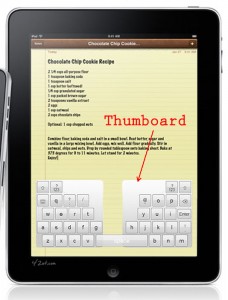
It’ll be best to try it on an actual iPad when it ships, which shouldn’t be too long now. There is also a bookmarklet to enable the Thumboard on any website. Try the ‘rotate’ button to simulate rotating on the iPad.
Usage
<script type="text/javascript" src="getThumboard.js" charset="utf-8" >
</script>
This will load the necessary JS/CSS/HTML files and fire up the thumboard.
Or with callback:
<script type="text/javascript" src="getThumboard.js?cb=my_init" charset="utf-8" >
</script>
where my_init() is defined in your code, eg:
function my_init() {
     var options = {enterText:'Search'};
     new Thumboard(options);
}
Who knows, now that there seems to be Dvorak keyboard support for the iPad, why not a Thumboard!?
Update: Apr. 23. The demo has been improved and updated.  Work around for webkit bug selectionStart on readOnly inputs. Enter key support on forms (except webkit due to another bug!)